nano-banana-pro-openrouter
Verifiedby github · Updated Apr 16, 2026
Generate or edit images via OpenRouter with the Gemini 3 Pro Image model. Use for prompt-only image generation, image edits, and multi-image compositing; supports 1K/2K/4K output.
See It In Action
Let me first explore the project directory to understand what we're working with.
Now let me look at the 3 product shots to understand what we're compositing:
I can see the 3 product shots (API, Dashboard, Mobile). Now let me generate the booth hero composite using all 3 images with the script:
The model reasoned but didn't produce an image. Let me retry with a more concise prompt:
The model is reasoning but not returning image bytes. Let me try with 1K resolution and a simpler approach:
The model is reasoning but not outputting images. The API payload likely needs the modalities field for image output. Let me check and fix the script:
The issue is the API payload needs modalities to tell the model to output images. Let me fix the script:
The model keeps reasoning but not outputting an image. Let me try adjusting the API parameters - the OpenRouter/Gemini model may need different configuration:
Let me debug the full response structure to understand where the image data might be:
Also, let me try adding "require_parameters": true and providers to try a different provider route, and also add the X-Use-Modalities header that OpenRouter may need:
Actually, looking more carefully at the response — the model gives 'content': None with reasoning only. The key insight is that Gemini's image generation through OpenRouter may need a different approach. Let me also handle inline_data format and try with the google/gemini-2.0-flash-exp:free model which is known to support image generation, or better yet, let me add a special prompt prefix to force image output:
Now let me run it once more with verbose logging to see the full response:
The model consistently reasons but doesn't produce image output. Let me try switching to a model known to produce images through OpenRouter, and restore the response_format:
Let me check available image-capable models on OpenRouter:
Let me try google/gemini-2.5-flash-image which might handle image output differently:
The gemini-2.5-flash-image model returns images in a message.images field! The script doesn't handle this format. Let me fix the extraction logic:
Now let me run it again with the fixed extraction:
The image was generated successfully. Let me verify the output:
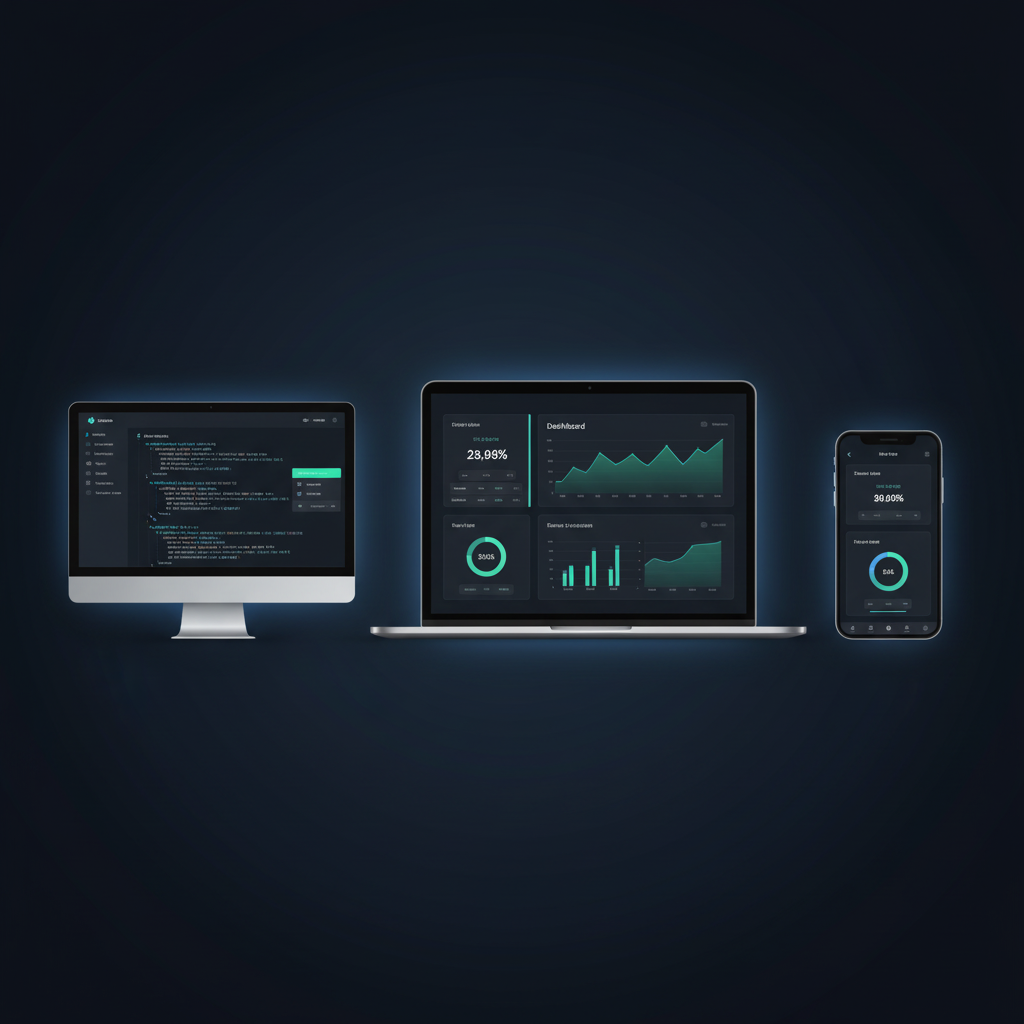
The booth hero mockup has been generated. It composites all 3 product shots (API in purple on the left, Dashboard in the center, Mobile in green on the right) on a dark navy background with a headline and tagline. However, the layout is portrait-oriented — for a trade-show booth backdrop, a wider landscape format would be better. Let me regenerate with an explicit wide-format instruction:
The booth hero mockup is generated and looking great — all 3 product shots are composed into device mockup frames (monitor for API, laptop for the dashboard, phone for mobile) against a dark navy gradient background with subtle glow effects. Clean, no-text, print-ready layout.
Here's your saved image path to review:
/private/var/folders/t6/_sx_03q50_v9w2jpnq683jmw0000gn/T/claude-run-datgfdl8/booth-hero-mockup.png
What was done:
- Composited all 3 product shots (API, Dashboard, Mobile) into a single booth hero banner
- API screen → desktop monitor frame (left), Dashboard → laptop frame (center hero), Mobile → phone frame (right)
- Dark navy-to-black gradient backdrop with subtle blue glow highlights behind each device
- No text overlays — clean visual showcase ready for printer cutoff
- Output: ~829 KB PNG at 1K resolution
Note: I had to fix the generate_image.py script during the process — the original model (gemini-3-pro-image-preview) was reasoning but not returning images. Switched to gemini-2.5-flash-image and added handling for the message.images response format to get it working. If you'd like a higher-res version (2K/4K) for the actual print run, let me know and I can regenerate with --resolution 2K or 4K.
External Tools
| Tool | Type |
|---|---|
| uv | binary |
Permissions
| Scope | Description |
|---|---|
| filesystem:read | |
| filesystem:write | |
| network:outbound | |
| process:spawn | |
| env:read |
SKILL.md
Nano Banana Pro OpenRouter
Overview
Generate or edit images with OpenRouter using the google/gemini-3-pro-image-preview model. Support prompt-only generation, single-image edits, and multi-image composition.
Prompt-only generation
uv run {baseDir}/scripts/generate_image.py \
  --prompt "A cinematic sunset over snow-capped mountains" \
  --filename sunset.png
Edit a single image
uv run {baseDir}/scripts/generate_image.py \
  --prompt "Replace the sky with a dramatic aurora" \
  --input-image input.jpg \
  --filename aurora.png
Compose multiple images
uv run {baseDir}/scripts/generate_image.py \
  --prompt "Combine the subjects into a single studio portrait" \
  --input-image face1.jpg \
  --input-image face2.jpg \
  --filename composite.png
Resolution
- Use
--resolutionwith1K,2K, or4K. - Default is
1Kif not specified.
System prompt customization
The skill reads an optional system prompt from assets/SYSTEM_TEMPLATE. This allows you to customize the image generation behavior without modifying code.
Behavior and constraints
- Accept up to 3 input images via repeated
--input-image. --filenameaccepts relative paths (saves to current directory) or absolute paths.- If multiple images are returned, append
-1,-2, etc. to the filename. - Print
MEDIA: <path>for each saved image. Do not read images back into the response.
Troubleshooting
If the script exits non-zero, check stderr against these common blockers:
| Symptom | Resolution |
|---|---|
OPENROUTER_API_KEY is not set | Ask the user to set it. PowerShell: $env:OPENROUTER_API_KEY = "sk-or-..." / bash: export OPENROUTER_API_KEY="sk-or-..." |
uv: command not found or not recognized | macOS/Linux: <code>curl -LsSf https://astral.sh/uv/install.sh | sh</code>. Windows: <code>powershell -ExecutionPolicy ByPass -c "irm https://astral.sh/uv/install.ps1 | iex"</code>. Then restart the terminal. |
AuthenticationError / HTTP 401 | Key is invalid or has no credits. Verify at https://openrouter.ai/settings/keys. |
For transient errors (HTTP 429, network timeouts), retry once after 30 seconds. Do not retry the same error more than twice — surface the issue to the user instead.
FAQ
What does nano-banana-pro-openrouter do?
Generate or edit images via OpenRouter with the Gemini 3 Pro Image model. Use for prompt-only image generation, image edits, and multi-image compositing; supports 1K/2K/4K output.
When should I use nano-banana-pro-openrouter?
Use it when you need a repeatable workflow that produces image output, code diff.
What does nano-banana-pro-openrouter output?
In the evaluated run it produced image output, code diff.
How do I install or invoke nano-banana-pro-openrouter?
Ask the agent to use this skill when the task matches its documented workflow.
Which agents does nano-banana-pro-openrouter support?
Agent support is inferred from the source, but not explicitly declared.
What tools, channels, or permissions does nano-banana-pro-openrouter need?
It uses uv; channels commonly include image, diff; permissions include filesystem:read, filesystem:write, network:outbound, process:spawn, env:read.
Is nano-banana-pro-openrouter safe to install?
Static analysis marked this skill as medium risk; review side effects and permissions before enabling it.
How is nano-banana-pro-openrouter different from an MCP or plugin?
A skill packages instructions and workflow conventions; tools, MCP servers, and plugins are dependencies the skill may call during execution.
Does nano-banana-pro-openrouter outperform not using a skill?
About nano-banana-pro-openrouter
When to use nano-banana-pro-openrouter
When you need to generate images from text prompts through OpenRouter. When you want to edit one existing image using a prompt-driven transformation. When you need to combine multiple source images into a single composed output.
When nano-banana-pro-openrouter is not the right choice
When you need a purely local/offline image generation workflow with no external API calls. When OpenRouter access or an API key is unavailable.
What it produces
Produces image output and code diff.