baoyu-article-illustrator
Verifiedby JimLiu · Updated Apr 16, 2026
Analyzes article structure, identifies positions requiring visual aids, generates illustrations with Type × Style two-dimension approach. Use when user asks to "illustrate article", "add images", "generate images for article", or "为文章配图".
See It In Action
Now I have a clear picture. The article has several key sections that need visuals, and the skill config specifies the brand style (blue #2563EB accent, neutral grays, clean white backgrounds, minimal/modern). Let me create the diagrams and integrate them.
Now let me verify all images were created and then update the article with the embedded visuals:
Good. Now let me update the article to embed all the visuals:
Now let me verify the final article reads correctly:
The article is fully illustrated and ready for review. Here's a summary of what I did:
5 SVG diagrams created in imgs/, all following the brand style from EXTEND.md (blue #2563EB accent, neutral grays, clean white backgrounds, sans-serif typography, 16:9-ish aspect ratios, minimal/modern style):
| File | Section | What it shows |
|---|---|---|
hero-architecture.svg | The Orchestrator Pattern | Full end-to-end flow — user request → orchestrator (3 phases: Decompose, Schedule, Synthesize) → parallel agents (Web Search, Code Exec, File Gen) → final deliverable |
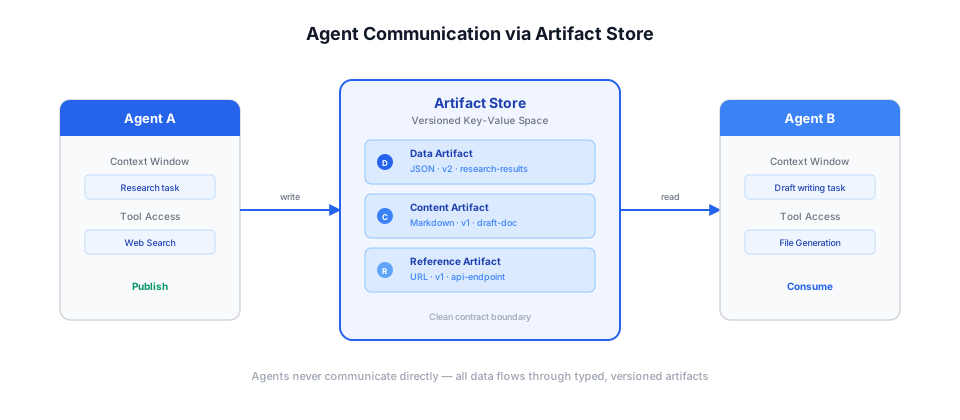
artifact-store.svg | Agent Communication Protocol | Agent A publishing to the versioned artifact store, Agent B consuming — with the three artifact types (Data/Content/Reference) visualized inside the store |
fault-tolerance.svg | Fault Tolerance and Recovery | Three-layer diagram — retry with exponential backoff (1s→4s→16s), subtask redistribution (Agent X → Agent Y), and partial completion (3/4 tasks succeed) — with a progress bar showing the 94% auto-recovery rate |
trace-viewer.svg | Observability Stack | A mock trace viewer UI with sidebar metrics, a dependency graph (Decompose → parallel Research/Extract/CodeGen → Synthesis), color-coded status, and a Gantt-style timeline |
whats-next-roadmap.svg | What's Next | A horizontal timeline with three numbered milestones for Q3: Adaptive Model Routing, Streaming Synthesis, User-Defined Workflows |
Each diagram is embedded in the article right below its section heading with descriptive alt text. The article text is untouched — only the image references were added. Ready for your review.
Permissions
| Scope | Description |
|---|---|
| filesystem:read | |
| filesystem:write |
SKILL.md
Article Illustrator
Analyze articles, identify illustration positions, generate images with Type × Style consistency.
Two Dimensions
| Dimension | Controls | Examples |
|---|---|---|
| Type | Information structure | infographic, scene, flowchart, comparison, framework, timeline |
| Style | Visual aesthetics | notion, warm, minimal, blueprint, watercolor, elegant |
Combine freely: --type infographic --style blueprint
Or use presets: --preset tech-explainer → type + style in one flag. See Style Presets.
Types
| Type | Best For |
|---|---|
infographic | Data, metrics, technical |
scene | Narratives, emotional |
flowchart | Processes, workflows |
comparison | Side-by-side, options |
framework | Models, architecture |
timeline | History, evolution |
Styles
See references/styles.md for Core Styles, full gallery, and Type × Style compatibility.
Workflow
- [ ] Step 1: Pre-check (EXTEND.md, references, config)
- [ ] Step 2: Analyze content
- [ ] Step 3: Confirm settings (AskUserQuestion)
- [ ] Step 4: Generate outline
- [ ] Step 5: Generate images
- [ ] Step 6: Finalize
Step 1: Pre-check
1.5 Load Preferences (EXTEND.md) ⛔ BLOCKING
# macOS, Linux, WSL, Git Bash
test -f .baoyu-skills/baoyu-article-illustrator/EXTEND.md && echo "project"
test -f "${XDG_CONFIG_HOME:-$HOME/.config}/baoyu-skills/baoyu-article-illustrator/EXTEND.md" && echo "xdg"
test -f "$HOME/.baoyu-skills/baoyu-article-illustrator/EXTEND.md" && echo "user"
# PowerShell (Windows)
if (Test-Path .baoyu-skills/baoyu-article-illustrator/EXTEND.md) { "project" }
$xdg = if ($env:XDG_CONFIG_HOME) { $env:XDG_CONFIG_HOME } else { "$HOME/.config" }
if (Test-Path "$xdg/baoyu-skills/baoyu-article-illustrator/EXTEND.md") { "xdg" }
if (Test-Path "$HOME/.baoyu-skills/baoyu-article-illustrator/EXTEND.md") { "user" }
| Result | Action |
|---|---|
| Found | Read, parse, display summary |
| Not found | ⛔ Run first-time-setup |
Full procedures: references/workflow.md
Step 2: Analyze
| Analysis | Output |
|---|---|
| Content type | Technical / Tutorial / Methodology / Narrative |
| Purpose | information / visualization / imagination |
| Core arguments | 2-5 main points |
| Positions | Where illustrations add value |
CRITICAL: Metaphors → visualize underlying concept, NOT literal image.
Full procedures: references/workflow.md
Step 3: Confirm Settings ⚠️
ONE AskUserQuestion, max 4 Qs. Q1-Q2 REQUIRED. Q3 required unless preset chosen.
| Q | Options |
|---|---|
| Q1: Preset or Type | [Recommended preset], [alt preset], or manual: infographic, scene, flowchart, comparison, framework, timeline, mixed |
| Q2: Density | minimal (1-2), balanced (3-5), per-section (Recommended), rich (6+) |
| Q3: Style | [Recommended], minimal-flat, sci-fi, hand-drawn, editorial, scene, poster, Other — skip if preset chosen |
| Q4: Language | When article language ≠ EXTEND.md setting |
Full procedures: references/workflow.md
Step 4: Generate Outline
Save outline.md with frontmatter (type, density, style, image_count) and entries:
## Illustration 1
**Position**: [section/paragraph]
**Purpose**: [why]
**Visual Content**: [what]
**Filename**: 01-infographic-concept-name.png
Full template: references/workflow.md
Step 5: Generate Images
⛔ BLOCKING: Prompt files MUST be saved before ANY image generation.
Execution strategy: When multiple illustrations have saved prompt files and the task is now plain generation, prefer baoyu-imagine batch mode (build-batch.ts → --batchfile) over spawning subagents. Use subagents only when each image still needs separate prompt iteration or creative exploration.
- For each illustration, create a prompt file per references/prompt-construction.md
- Save to
prompts/NN-{type}-{slug}.mdwith YAML frontmatter - Prompts MUST use type-specific templates with structured sections (ZONES / LABELS / COLORS / STYLE / ASPECT)
- LABELS MUST include article-specific data: actual numbers, terms, metrics, quotes
- DO NOT pass ad-hoc inline prompts to
--promptwithout saving prompt files first - Select generation skill, process references (
direct/style/palette) - Apply watermark if EXTEND.md enabled
- Generate from saved prompt files; retry once on failure
Full procedures: references/workflow.md
Step 6: Finalize
Insert  after paragraphs. Path computed relative to article file based on output directory setting.
Article Illustration Complete!
Article: [path] | Type: [type] | Density: [level] | Style: [style]
Images: X/N generated
Output Directory
Output directory is determined by default_output_dir in EXTEND.md (set during first-time setup):
default_output_dir | Output Path | Markdown Insert Path |
|---|---|---|
imgs-subdir (default) | {article-dir}/imgs/ | imgs/NN-{type}-{slug}.png |
same-dir | {article-dir}/ | NN-{type}-{slug}.png |
illustrations-subdir | {article-dir}/illustrations/ | illustrations/NN-{type}-{slug}.png |
independent | illustrations/{topic-slug}/ | illustrations/{topic-slug}/NN-{type}-{slug}.png (relative to cwd) |
All auxiliary files (outline, prompts) are saved inside the output directory:
{output-dir}/
├── outline.md
├── prompts/
│   └── NN-{type}-{slug}.md
└── NN-{type}-{slug}.png
When input is pasted content (no file path), always uses illustrations/{topic-slug}/ with source-{slug}.{ext} saved alongside.
Slug: 2-4 words, kebab-case. Conflict: append -YYYYMMDD-HHMMSS.
Modification
| Action | Steps |
|---|---|
| Edit | Update prompt → Regenerate → Update reference |
| Add | Position → Prompt → Generate → Update outline → Insert |
| Delete | Delete files → Remove reference → Update outline |
References
| File | Content |
|---|---|
| references/workflow.md | Detailed procedures |
| references/usage.md | Command syntax |
| references/styles.md | Style gallery |
| references/style-presets.md | Preset shortcuts (type + style) |
| references/prompt-construction.md | Prompt templates |
| references/config/first-time-setup.md | First-time setup |
FAQ
What does baoyu-article-illustrator do?
Analyzes article structure, identifies positions requiring visual aids, generates illustrations with Type × Style two-dimension approach. Use when user asks to "illustrate article", "add images", "generate images for article", or "为文章配图".
When should I use baoyu-article-illustrator?
Use it when you need a repeatable workflow that produces image output, code diff.
What does baoyu-article-illustrator output?
In the evaluated run it produced image output, code diff.
How do I install or invoke baoyu-article-illustrator?
Ask the agent to use this skill when the task matches its documented workflow.
Which agents does baoyu-article-illustrator support?
Agent support is inferred from the source, but not explicitly declared.
What tools, channels, or permissions does baoyu-article-illustrator need?
It uses no extra tools; channels commonly include image, diff; permissions include filesystem:read, filesystem:write.
Is baoyu-article-illustrator safe to install?
Static analysis marked this skill as medium risk; review side effects and permissions before enabling it.
How is baoyu-article-illustrator different from an MCP or plugin?
A skill packages instructions and workflow conventions; tools, MCP servers, and plugins are dependencies the skill may call during execution.
Does baoyu-article-illustrator outperform not using a skill?
About baoyu-article-illustrator
When to use baoyu-article-illustrator
When you want to add structured illustrations to a markdown article or blog post. When you need prompt files, image filenames, and insertion points organized consistently for multiple visuals. When revising an existing article to include diagrams, scenes, or explanatory graphics.
When baoyu-article-illustrator is not the right choice
When you only need general writing advice and do not want image assets or file modifications. When image generation is not part of the task and no article file or pasted article content is being processed.
What it produces
Produces image output and code diff.