baoyu-infographic
Verifiedby JimLiu · Updated Apr 16, 2026
Generates professional infographics with 21 layout types and 20 visual styles. Analyzes content, recommends layout×style combinations, and generates publication-ready infographics. Use when user asks to create "infographic", "信息图", "visual summary", "可视化", or "高密度信息大图".
See It In Action
Now I have a clear picture of the source, the confidential items to scrub, and the skill workflow. Let me proceed step by step.
Confidential items I'll strip: API keys/tokens (Bearer, CDN, Chromatic, GitHub PAT, DevOps API key), DB connection strings, internal URLs, email addresses, Slack handles, Jira IDs, internal repo names, and the specific budget figure.
Keeping: All 4 rollout phases with steps, the full metrics table, decisions (sanitized), and timeline.
Let me set up the output and run the analysis.
Now let me write the analysis and structured content:
Step 3: Layout × Style Recommendation
Since you asked for "clean" and this is a leadership all-hands slide mixing rollout phases + metrics, here are my top 3:
| # | Layout × Style | Why |
|---|---|---|
| 1 | bento-grid + corporate-memphis ← recommended | Clean, vibrant, professional. Portrait bento handles both 4 phases and the metrics table elegantly side-by-side. |
| 2 | linear-progression + corporate-memphis | Strong timeline narrative, but metrics table feels shoehorned at the end. |
| 3 | bento-grid + craft-handmade | Warmer/friendlier, but may feel too casual for leadership all-hands. |
I'll go with #1 (bento-grid + corporate-memphis, portrait 9:16) — say the word if you'd rather pivot. Proceeding to prompt + generation:
Now generating the infographic image:
Good first render! The layout and content are clean and confidential-free. Let me fix the emoji rendering issue in the Decisions section and polish:
The infographic is ready. Let me verify the output structure is complete:
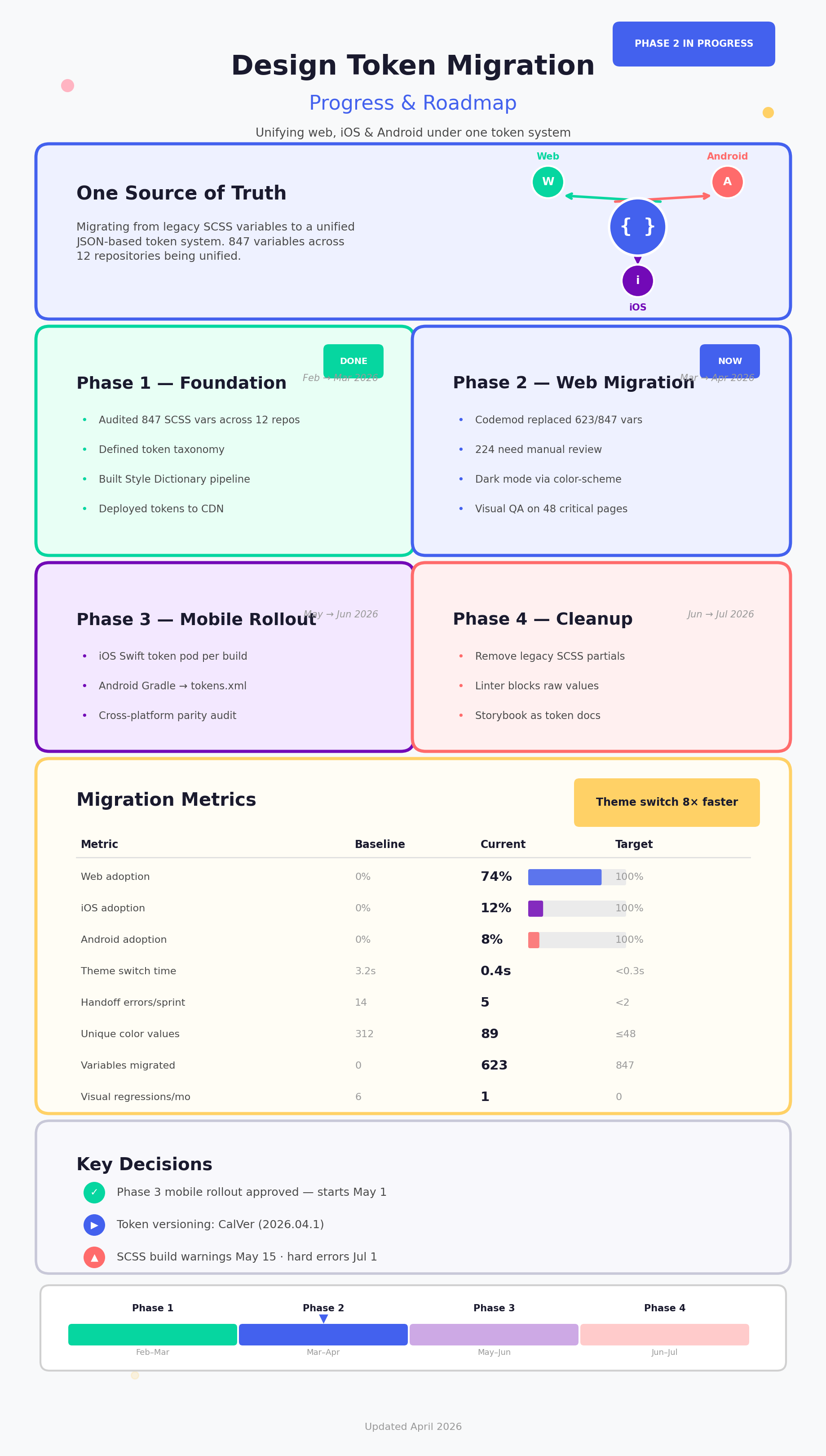
Here's your infographic at infographic/design-token-migration/infographic.png — portrait (9:16), ready to drop into a slide.
What's on it
| Section | Content |
|---|---|
| Hero | "One Source of Truth" — the unification story, hub-spoke showing Web / iOS / Android |
| Phase 1–4 modules | All rollout steps preserved with date ranges, color-coded (green → blue → purple → coral) |
| Migration Metrics | Full 8-row table with Baseline → Current → Target, progress bars for adoption %, and a "Theme switch 8× faster" callout |
| Key Decisions | Phase 3 approval, CalVer adoption, SCSS deprecation timeline |
| Timeline strip | Bottom bar with "you are here" marker on Phase 2 |
What was scrubbed
All confidential material removed: API keys & bearer tokens (5), CDN/Chromatic/GitHub credentials, DB connection string, internal URLs, email addresses, Slack handles, Jira epic ID, budget figures, internal repo names, and service account details. None of that appears in any output file.
Output files
infographic/design-token-migration/
├── source-design-token-migration.md   # original (local reference only)
├── analysis.md                        # content analysis + scrub list
├── structured-content.md              # visual-ready content structure
├── prompts/infographic.md             # full generation prompt (reusable)
└── infographic.png                    # the slide-ready image ← this one
Permissions
| Scope | Description |
|---|---|
| filesystem:read | |
| filesystem:write |
SKILL.md
Infographic Generator
Two dimensions: layout (information structure) × style (visual aesthetics). Freely combine any layout with any style.
Usage
/baoyu-infographic path/to/content.md
/baoyu-infographic path/to/content.md --layout hierarchical-layers --style technical-schematic
/baoyu-infographic path/to/content.md --aspect portrait --lang zh
/baoyu-infographic path/to/content.md --aspect 3:4
/baoyu-infographic  # then paste content
Options
| Option | Values |
|---|---|
--layout | 21 options (see Layout Gallery), default: bento-grid |
--style | 20 options (see Style Gallery), default: craft-handmade |
--aspect | Named: landscape (16:9), portrait (9:16), square (1:1). Custom: any W:H ratio (e.g., 3:4, 4:3, 2.35:1) |
--lang | en, zh, ja, etc. |
Layout Gallery
| Layout | Best For |
|---|---|
linear-progression | Timelines, processes, tutorials |
binary-comparison | A vs B, before-after, pros-cons |
comparison-matrix | Multi-factor comparisons |
hierarchical-layers | Pyramids, priority levels |
tree-branching | Categories, taxonomies |
hub-spoke | Central concept with related items |
structural-breakdown | Exploded views, cross-sections |
bento-grid | Multiple topics, overview (default) |
iceberg | Surface vs hidden aspects |
bridge | Problem-solution |
funnel | Conversion, filtering |
isometric-map | Spatial relationships |
dashboard | Metrics, KPIs |
periodic-table | Categorized collections |
comic-strip | Narratives, sequences |
story-mountain | Plot structure, tension arcs |
jigsaw | Interconnected parts |
venn-diagram | Overlapping concepts |
winding-roadmap | Journey, milestones |
circular-flow | Cycles, recurring processes |
dense-modules | High-density modules, data-rich guides |
Full definitions: references/layouts/<layout>.md
Style Gallery
| Style | Description |
|---|---|
craft-handmade | Hand-drawn, paper craft (default) |
claymation | 3D clay figures, stop-motion |
kawaii | Japanese cute, pastels |
storybook-watercolor | Soft painted, whimsical |
chalkboard | Chalk on black board |
cyberpunk-neon | Neon glow, futuristic |
bold-graphic | Comic style, halftone |
aged-academia | Vintage science, sepia |
corporate-memphis | Flat vector, vibrant |
technical-schematic | Blueprint, engineering |
origami | Folded paper, geometric |
pixel-art | Retro 8-bit |
ui-wireframe | Grayscale interface mockup |
subway-map | Transit diagram |
ikea-manual | Minimal line art |
knolling | Organized flat-lay |
lego-brick | Toy brick construction |
pop-laboratory | Blueprint grid, coordinate markers, lab precision |
morandi-journal | Hand-drawn doodle, warm Morandi tones |
retro-pop-grid | 1970s retro pop art, Swiss grid, thick outlines |
Full definitions: references/styles/<style>.md
Recommended Combinations
| Content Type | Layout + Style |
|---|---|
| Timeline/History | linear-progression + craft-handmade |
| Step-by-step | linear-progression + ikea-manual |
| A vs B | binary-comparison + corporate-memphis |
| Hierarchy | hierarchical-layers + craft-handmade |
| Overlap | venn-diagram + craft-handmade |
| Conversion | funnel + corporate-memphis |
| Cycles | circular-flow + craft-handmade |
| Technical | structural-breakdown + technical-schematic |
| Metrics | dashboard + corporate-memphis |
| Educational | bento-grid + chalkboard |
| Journey | winding-roadmap + storybook-watercolor |
| Categories | periodic-table + bold-graphic |
| Product Guide | dense-modules + morandi-journal |
| Technical Guide | dense-modules + pop-laboratory |
| Trendy Guide | dense-modules + retro-pop-grid |
Default: bento-grid + craft-handmade
Keyword Shortcuts
When user input contains these keywords, auto-select the associated layout and offer associated styles as top recommendations in Step 3. Skip content-based layout inference for matched keywords.
If a shortcut has Prompt Notes, append them to the generated prompt (Step 5) as additional style instructions.
| User Keyword | Layout | Recommended Styles | Default Aspect | Prompt Notes |
|---|---|---|---|---|
| 高密度信息大图 / high-density-info | dense-modules | morandi-journal, pop-laboratory, retro-pop-grid | portrait | — |
| 信息图 / infographic | bento-grid | craft-handmade | landscape | Minimalist: clean canvas, ample whitespace, no complex background textures. Simple cartoon elements and icons only. |
Output Structure
infographic/{topic-slug}/
├── source-{slug}.{ext}
├── analysis.md
├── structured-content.md
├── prompts/infographic.md
└── infographic.png
Slug: 2-4 words kebab-case from topic. Conflict: append -YYYYMMDD-HHMMSS.
Core Principles
- Preserve source data faithfully—no summarization or rephrasing (but strip any credentials, API keys, tokens, or secrets before including in outputs)
- Define learning objectives before structuring content
- Structure for visual communication (headlines, labels, visual elements)
Workflow
Step 1: Setup & Analyze
1.1 Load Preferences (EXTEND.md)
Check EXTEND.md existence (priority order):
# macOS, Linux, WSL, Git Bash
test -f .baoyu-skills/baoyu-infographic/EXTEND.md && echo "project"
test -f "${XDG_CONFIG_HOME:-$HOME/.config}/baoyu-skills/baoyu-infographic/EXTEND.md" && echo "xdg"
test -f "$HOME/.baoyu-skills/baoyu-infographic/EXTEND.md" && echo "user"
# PowerShell (Windows)
if (Test-Path .baoyu-skills/baoyu-infographic/EXTEND.md) { "project" }
$xdg = if ($env:XDG_CONFIG_HOME) { $env:XDG_CONFIG_HOME } else { "$HOME/.config" }
if (Test-Path "$xdg/baoyu-skills/baoyu-infographic/EXTEND.md") { "xdg" }
if (Test-Path "$HOME/.baoyu-skills/baoyu-infographic/EXTEND.md") { "user" }
┌────────────────────────────────────────────────────┬───────────────────┐ │ Path │ Location │ ├────────────────────────────────────────────────────┼───────────────────┤ │ .baoyu-skills/baoyu-infographic/EXTEND.md │ Project directory │ ├────────────────────────────────────────────────────┼───────────────────┤ │ $HOME/.baoyu-skills/baoyu-infographic/EXTEND.md │ User home │ └────────────────────────────────────────────────────┴───────────────────┘
┌───────────┬───────────────────────────────────────────────────────────────────────────┐ │ Result │ Action │ ├───────────┼───────────────────────────────────────────────────────────────────────────┤ │ Found │ Read, parse, display summary │ ├───────────┼───────────────────────────────────────────────────────────────────────────┤ │ Not found │ Ask user with AskUserQuestion (see references/config/first-time-setup.md) │ └───────────┴───────────────────────────────────────────────────────────────────────────┘
EXTEND.md Supports: Preferred layout/style | Default aspect ratio | Custom style definitions | Language preference
Schema: references/config/preferences-schema.md
1.2 Analyze Content → analysis.md
- Save source content (file path or paste →
source.md)- Backup rule: If
source.mdexists, rename tosource-backup-YYYYMMDD-HHMMSS.md
- Backup rule: If
- Analyze: topic, data type, complexity, tone, audience
- Detect source language and user language
- Extract design instructions from user input
- Save analysis
- Backup rule: If
analysis.mdexists, rename toanalysis-backup-YYYYMMDD-HHMMSS.md
- Backup rule: If
See references/analysis-framework.md for detailed format.
Step 2: Generate Structured Content → structured-content.md
Transform content into infographic structure:
- Title and learning objectives
- Sections with: key concept, content (verbatim), visual element, text labels
- Data points (all statistics/quotes copied exactly)
- Design instructions from user
Rules: Markdown only. No new information. Preserve data faithfully. Strip any credentials or secrets from output.
See references/structured-content-template.md for detailed format.
Step 3: Recommend Combinations
3.1 Check Keyword Shortcuts first: If user input matches a keyword from the Keyword Shortcuts table, auto-select the associated layout and prioritize associated styles as top recommendations. Skip content-based layout inference.
3.2 Otherwise, recommend 3-5 layout×style combinations based on:
- Data structure → matching layout
- Content tone → matching style
- Audience expectations
- User design instructions
Step 4: Confirm Options
Use single AskUserQuestion call with multiple questions to confirm all options together:
| Question | When | Options |
|---|---|---|
| Combination | Always | 3+ layout×style combos with rationale |
| Aspect | Always | Named presets (landscape/portrait/square) or custom W:H ratio (e.g., 3:4, 4:3, 2.35:1) |
| Language | Only if source ≠ user language | Language for text content |
Important: Do NOT split into separate AskUserQuestion calls. Combine all applicable questions into one call.
Step 5: Generate Prompt → prompts/infographic.md
Backup rule: If prompts/infographic.md exists, rename to prompts/infographic-backup-YYYYMMDD-HHMMSS.md
Combine:
- Layout definition from
references/layouts/<layout>.md - Style definition from
references/styles/<style>.md - Base template from
references/base-prompt.md - Structured content from Step 2
- All text in confirmed language
Aspect ratio resolution for {{ASPECT_RATIO}}:
- Named presets → ratio string: landscape→
16:9, portrait→9:16, square→1:1 - Custom W:H ratios → use as-is (e.g.,
3:4,4:3,2.35:1)
Step 6: Generate Image
- Select available image generation skill (ask user if multiple)
- Check for existing file: Before generating, check if
infographic.pngexists- If exists: Rename to
infographic-backup-YYYYMMDD-HHMMSS.png
- If exists: Rename to
- Call with prompt file and output path
- On failure, auto-retry once
Step 7: Output Summary
Report: topic, layout, style, aspect, language, output path, files created.
References
references/analysis-framework.md- Analysis methodologyreferences/structured-content-template.md- Content formatreferences/base-prompt.md- Prompt templatereferences/layouts/<layout>.md- 21 layout definitionsreferences/styles/<style>.md- 20 style definitions
Extension Support
Custom configurations via EXTEND.md. See Step 1.1 for paths and supported options.
FAQ
What does baoyu-infographic do?
Generates professional infographics with 21 layout types and 20 visual styles. Analyzes content, recommends layout×style combinations, and generates publication-ready infographics. Use when user asks to create "infographic", "信息图", "visual summary", "可视化", or "高密度信息大图".
When should I use baoyu-infographic?
Use it when you need a repeatable workflow that produces text report, image output.
What does baoyu-infographic output?
In the evaluated run it produced text report, image output.
How do I install or invoke baoyu-infographic?
Ask the agent to use this skill when the task matches its documented workflow.
Which agents does baoyu-infographic support?
Agent support is inferred from the source, but not explicitly declared.
What tools, channels, or permissions does baoyu-infographic need?
It uses no extra tools; channels commonly include text, image; permissions include filesystem:read, filesystem:write.
Is baoyu-infographic safe to install?
Static analysis marked this skill as medium risk; review side effects and permissions before enabling it.
How is baoyu-infographic different from an MCP or plugin?
A skill packages instructions and workflow conventions; tools, MCP servers, and plugins are dependencies the skill may call during execution.
Does baoyu-infographic outperform not using a skill?
About baoyu-infographic
When to use baoyu-infographic
When you want to convert notes or documents into an infographic-ready structure. When you need layout and style recommendations for a visual summary. When preparing publication-ready prompt files and supporting markdown artifacts for infographic creation.
When baoyu-infographic is not the right choice
When you need the agent to actually render graphics or images by itself using external design tools. When the task is simple text summarization without infographic-oriented structuring.
What it produces
Produces text report and image output.